| When you download a file, such as a Zip file, using Internet Explorer, the File Download dialog will open and allow you to choose whether you want to Open or Save the file. This dialog typically includes a check box labeled Always ask before opening this type of file which is checked by default. This insures that the dialog will continue to display at other times when you download the same type of file.
However, if you uncheck this box and choose to Open the file being downloaded (see the picture below), the next time you attempt to download another file of this type you will not have the opportunity to choose whether to open or save the file. The File Download dialog will no longer appear. | |
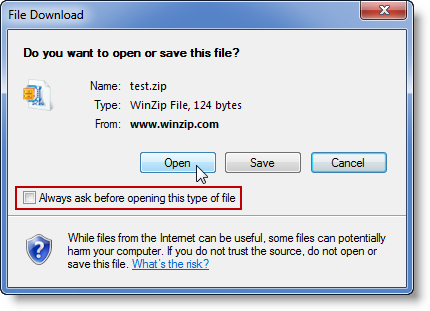 Please see the steps below if you want Internet Explorer to display the File Download dialog for this file type again. Please see the steps below if you want Internet Explorer to display the File Download dialog for this file type again. Note: The latest versions of Internet Explorer on Windows 8 and Windows 7 do not offer an "Always ask..." checkbox. This issue should not occur in such cases. Windows 7 / Windows VistaUnlike earlier versions of Windows, there is no option offered in a user interface for resetting or changing this behavior. The only way, of which we are aware, for setting this back to the default without resetting all Internet Explorer zones is by editing the Windows Registry.To begin, do this:
Note: {0002DF01-0000-0000-C000-000000000046} is the Class ID for the InternetExplorer.Application object. Inside this registry key, there will be a list of value data corresponding to all the file types for which you have unchecked the Always ask before opening this type of file box. For example, if WinZip automatically opens Zip files you download, you will see WinZip in the list. Deleting the WinZip entry from this list will reset the behavior for all files that would normally be opened by WinZip. Another option would be to do the following:
Windows XP
| |
Friday, 13 December 2013
How to Stop Internet Explorer from Opening dowloaded Zip Files


Subscribe to:
Post Comments (Atom)
No comments:
Post a Comment